How AI Enabled Analytics Can Learn From Your Own Alerts – A Feedback Loop for Physical Security Video Platforms
When an AI enabled camera sees something odd—a person climbing a fence, a vehicle moving the wrong way, or a suspicious package in a hallway—the system throws an alarm. Today most commercial platforms either stop there or dump every alarm into a human analyst’s to‑do list. The next wave of smart video management is showing its value when those alerts become data points that teach the AI how to get better.
Below is a quick rundown of why you should care about event tagging, batch upload, and on‑device model fine‑tuning, and exactly how it works in practice.
- The Core Idea – Turn Every Alert into a Teaching Sample
| What Happens Today | What We Want Tomorrow |
| Alarm fires → analyst decides manually whether to investigate. | Alarm fires → system records the event. Optionally, a user manually tags its alarm quality and object type. After a batch is collected, those tags are sent back to the manufacturer’s AI factory for model fine‑tuning. |
| Model improvement relies only on pre‑collected public datasets (often outdated). | Your own field data continuously refines the base model without you having to rebuild anything. |
In short: Your “alarms” are gold; each one tells the AI system where its current understanding needs a tweak.
- The Three Simple Actions You Can Take
- Tagging – Assign three pieces of information to each stored event:
- Alarm status: “true alarm” (verified threat) or “false alarm” (benign).
- Confirmation flag: Did a security officer verify the incident? “Yes/No”.
- Object classification label – optional but powerful: person, vehicle, gun, fire, smoke, animal, etc.
- Batching & Uploading – When you hit a preset size (e.g., 100 to 500 events), the platform packages the tagged data and pushes it to a secure portal at your vendor (“AI Factory”).
- Model Refresh Cycle – Raw batch à fine‑tune base model à Updated model
The updated model is automatically downloaded to all devices in the field and applied with no manual intervention.
- What Happens Under the Hood?
- Detection Stage – The AI generates an alarm whenever its confidence exceeds a configurable threshold for one of the pre‑defined classes (person, vehicle, gun, animal, etc.).
- Event Posting – Each alarm is stored with metadata: timestamp, camera ID, motion trajectory, and the raw classification probabilities.
- Human In‑the‑Loop Confirmation
- When a guard or operator reviews the alert, they select “True” or “False.”
- They also pick an optional secondary label (e.g., “bag left unattended → animal”).
- Accumulation & Chunking – The VMS platform accumulates these confirmed events in a local buffer until it reaches the configured batch size.
- Secure Shipping to the vendor’s “AI Model Factory” – Using an encrypted web connection, the VMS platform batch uploads to the vendor’s cloud fine‑tuning service.
- AI Model Update – The Model Factory feeds the newly labeled data into a specialized training loop that adjusts only the “head” layers (the part responsible for detecting your specific threat types) while leaving the base model untouched.
- Rollout & Deployment – The refreshed model is packaged, signed, and pushed back to the customer’s VMS platform for delivery to every camera or NVR in your network. From this point forward, detection accuracy reflects both the original manufacturer’s expertise and the nuances you’ve taught it with your own footage.
- Why This Matters for Your Business
- Continuous Accuracy Improvement – False‑positive rates can drop dramatically after just a few hundred confirmed events, eliminating wasted response time and unnecessary security dispatches.
- Tailored Threat Profiling – If you run on an oil platform where “penguins” trigger alarms, labeling those as animal stops the AI from over‑responding to wildlife.
- Compliance & Auditing – Every tagged event creates an immutable audit trail that shows exactly how the system learned—a compelling narrative for regulators or internal risk teams.
- Operational Simplicity – No need for separate training projects, no heavy‑weight on‑site compute resources. The vendor does the heavy lifting; you just keep feeding it good data.
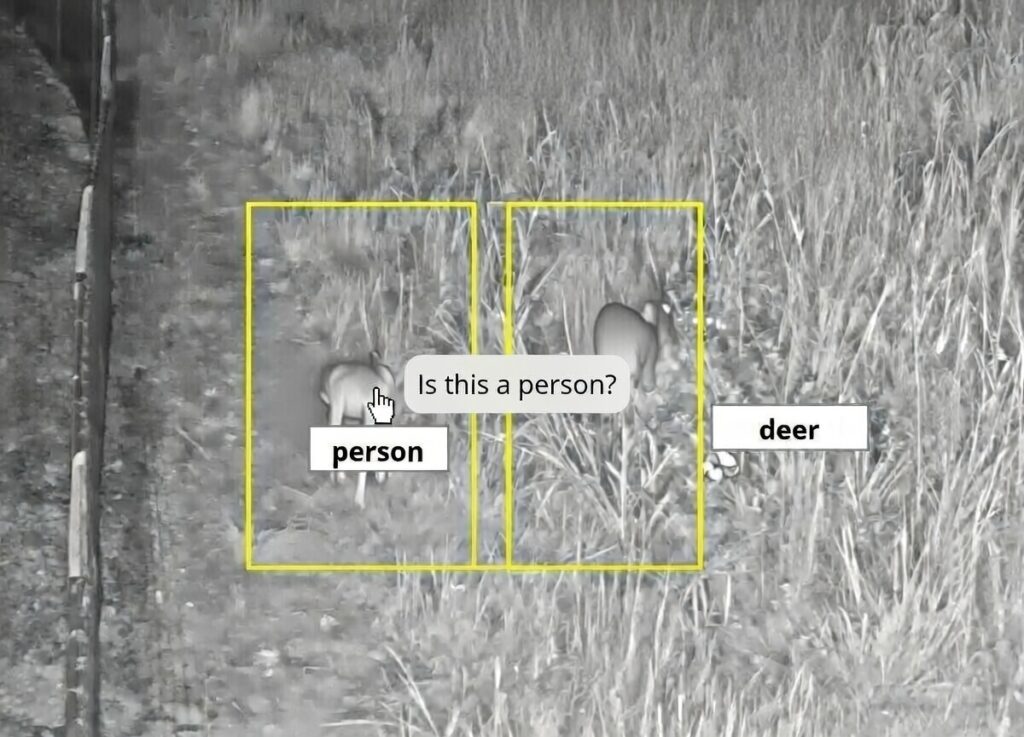
- A Minimal Example Flow
- Alarm: “Person is detected at Gate 3 at 02:14 am.” – Confidence 78%.
- Guard Review: “False alarm – animal present (deer).” → Tag = false, label = animal.
- Batch Fill: After 500 such events accumulate (e.g., many false alarms that turned out to be “wildlife”), platform sends the data.
- Model Update Received – Cameras in your site stop flagging alerts on animal detections, reducing unnecessary dispatch by ~30%.
- Looking Ahead – What’s Next?
- Self‑Optimizing Networks – Systems that automatically suggest which cameras or zones need more frequent tagging based on detection confidence spikes.
- Edge‑to‑Cloud Continuous Learning Loops – Real‑time model adaptation without waiting for a batch, using federated learning concepts to keep edge devices private yet collaborative.
- Hybrid Human‑AI Decision Boards – Visual dashboards where analysts can overlay “probability heatmaps” with their own tags, creating a shared intelligence layer.
- LLM AI Model Training – Using large language models to do the adjudication and automatically label the alerts for you.
Bottom Line: Turn Every Alarm Into Learning
Modern security platforms already spot threats—what’s missing is the feedback that lets them get smarter on their own. By tagging events as true / false and attaching simple classifications like “person” or “vehicle,” you hand the manufacturer a curated training set. Upload a batch, let them fine‑tune, install the updated model, and watch false alarms shrink while true positives hold steady.
That’s not “just another feature.” It’s a closed‑loop intelligence engine that keeps your security posture ahead of emerging threats—without hiring a team of data scientists.
Posted in: AI, Cloud Services, IP Video
Leave a Comment (0) → So, apart from bean counters constantly purporting that corporations are saving money in the cloud, the general premise is that the cloud is more “resilient” than your own corporate data center, and by offloading that infrastructure to the cloud you are more robust, resilient, and secure. Then… AWS has a major outage and proves all of this wrong.
 In yet another installment of “Why You Don’t Put Security Infrastructure in the Cloud”. I try to cover these whenever possible, but there are more informative and comprehensive articles out there by other parties such as IPVM that include more detail.